Back To Basics: Windows Live Writer


This post proudly produced in Windows Live Writer.
This is not advertising – at least I am not getting paid to say this. However I do know one of the guys in the Microsoft Live Team, Angus Logan. These guys are knocking themselves out to get to market internet based services that extend and improve our productivity when working wired or wireless.
And I have to say that Windows Live Writer is an awesome tool! Anybody who blogs should be using it. Any body who has a website that they regularly update should be using it.
The latest version (available now in technical preview) adds some great picture handling features that mirror some the the effects from Word 2007. Drop shadows, reflections, and more – done with simple mouse clicks. Posted straight to your blog. did I say how easy it was?
We are now utilising Live Writer as a major tool with the Drupal websites we build (see our portfolio) and installing it on our customers PCs and teaching them how to use it.
Here are my original instructions for making this work with Drupal.
I thought I would reduce the cryptic nature of those instructions and provide step by step instructions with screenshots.
These instructions are written for Drupal 5 and 6 websites.
Follow instructions 4 to the end for each content type you want to be able to create from Live Writer. I would recommend Blog entry and Page.
- In Drupal Site building, Modules, enable the Blog API module (core)

- In Drupal Site configuration Blog API enable the API for the entry types you want to be able to create from Live Writer.
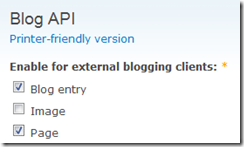
- In Drupal User Management, Permissions enable the create and edit options for the content type for each user role you need.
 Note that users will not be able to access other users content from Live Writer regardless of the permissions in Drupal.
 - Open Live Writer. If it is the first time you will get presented with the create weblog wizard. If not start that by clicking Weblog, Add Weblog Account.
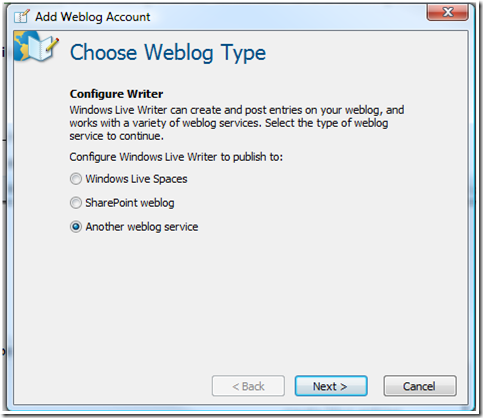
- Choose Another weblog service from the first box and click Next
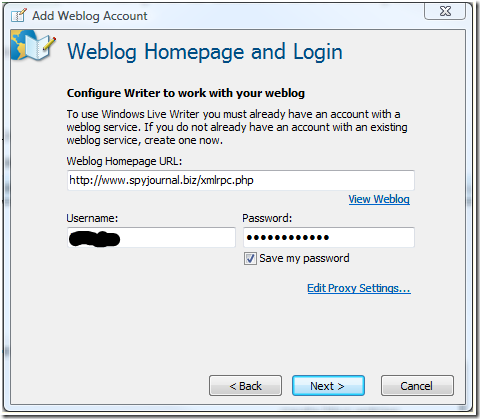
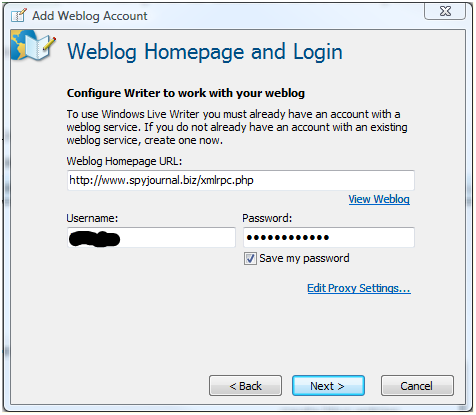
- Type the homepage URL as follows http://www.yoursitename.com/xmlrpc.php. Enter your user name and password and click Next.
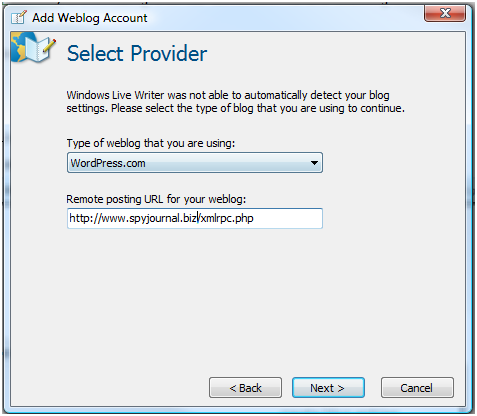
- Select the Weblog Provider. We will be emulating Wordpress.com so select that one and then enter the same address as before in the format http://www.yoursitename.com/xmlrpc.php and click Next.

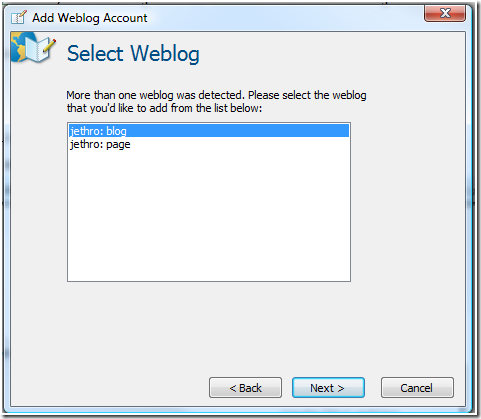
- If you enabled more than one content type you will be asked which one you are creating this account for. Select and click Next.
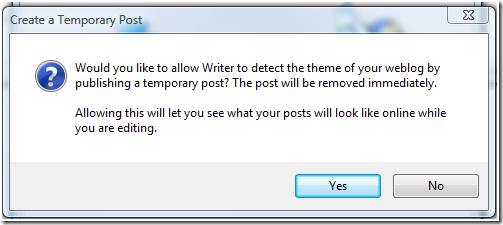
- The system detects your theme and then requests permission to create a temporary post – click Yes.
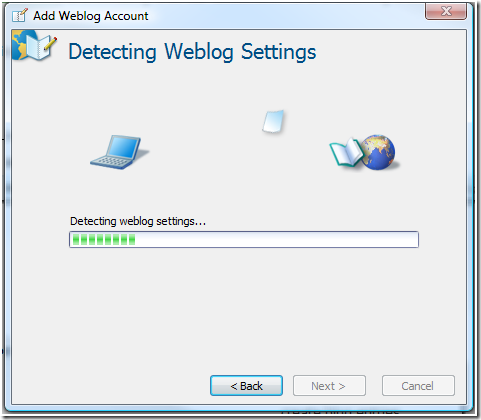
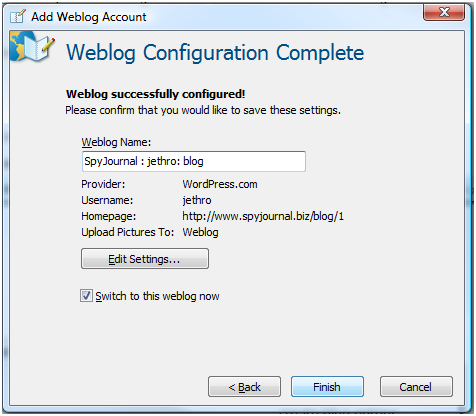
- After some more interrogation of your Drupal site it will complete and display this box. Here I choose to rename the weblog name so it makes sense, e.g. website, user name and content type.
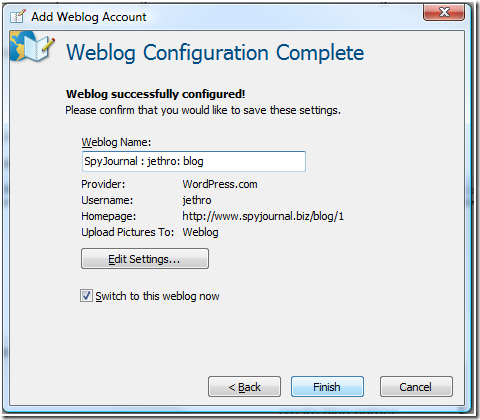
- Click Finish to complete the process.






Site Construction and Maintenance by Jethro Consultants

Gidday
Glad to have you stop in.
I write about my family, the internet, technology and gadgets, productivity with Microsoft Office applications Excel Tips and more.
Instagram Feed
Find Us On...


Subscribe by RSS




Copyright Notice. All documents and text contained in this web site www.spyjournal.biz and sub pages is copyright material of Timothy Miller © unless noted as being copyright material of someone else. No public reproduction of the content on this site in any form is permitted without express written permission. Privacy Policy


Recent comments
10 years 28 weeks ago
10 years 28 weeks ago
10 years 29 weeks ago
10 years 29 weeks ago
10 years 29 weeks ago
10 years 29 weeks ago
10 years 29 weeks ago
10 years 29 weeks ago
10 years 29 weeks ago
10 years 29 weeks ago